|
|
3#

楼主 |
发表于 2007-3-8 23:23:53
|
只看该作者
破解程序英文原文如下:
*************************************************************
*** OEM BIOS Emulation Toolkit For Windows Vista x86 v1.0 ***
*************************************************************
What's the purpose of this release?
~~~~~~~~~~~~~~~~~~~~~~~~~~~~~~~~~~~
Bypassing the product activation requirement of Microsoft Windows Vista x86.
How does it work?
~~~~~~~~~~~~~~~~~
Microsoft allows large hardware manufacturers (e.g. ASUS, HP, Dell) to ship their products
containing a Windows Vista installation that does NOT require any kind of product activation as
this might be considered an unnecessary inconvenience for the end-user.
Instead these so-called 'Royalty OEMs' are granted the right to embed certain license information
into their hardware products, which can be validated by Windows Vista to make obtaining further
activation information (online or by phone) obsolete.
This mechanism is commonly referred to as 'SLP 2.0' ('system-locked pre-installation 2.0') and
consists of the following three key elements:
1. The OEM's hardware-embedded BIOS ACPI_SLIC information signed by Microsoft.
2. A certificate issued by Microsoft that corresponds to the specific ACPI_SLIC information.
The certificate is an XML file found on the OEM's installation/recovery media,
ususally called something like 'oemname.xrm-ms'.
3. A special type of product key that corresponds to the installed edition of Windows Vista.
This key can usually be obtained from some installation script found on the OEM's
installation/recovery media or directly from a pre-installed OEM system.
If all three elements match Windows Vista's licensing mechansim considers the given
installation a valid system-locked pre-activated copy (that does not require any
additional product activation procedures).
So the basic concept of the tool at hand is to present any given BIOS ACPI_SLIC information to Windows
Vista's licensing mechanism by means of a device driver.
In combination with a matching product key and OEM certificate this allows for rendering any system
practically indistinguishable from a legit pre-activated system shipped by the respective OEM.
How do I use it?
~~~~~~~~~~~~~~~~
Preliminary hint:
Most operations described below require elevated privileges, so disabling UAC (Run->MSCONFIG.EXE->
Tools->Disable UAC) for the time being is recommended, Of course, it can be safely re-enabled after
all steps have been performed. Otherwise OEMTOOL.EXE and some SLMGR.VBS operations must be explicitly
run with adminstrative privileges.
1. Install the Windows Vista x86 edition of your choice without entering any product key during setup.
Basically any Windows Vista x86 installation media will do, regardless if it's MSDN/Retail/OEM/...,
MSDN/Retail are recommended though.
2. Install the emulation driver.
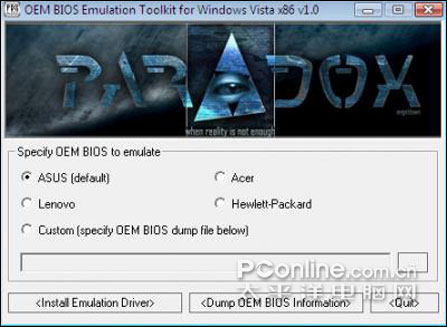
Run OEMTOOL.EXE, select the OEM BIOS information to emulate (ASUS might be a good choice given the
fact that it's the only OEM for which a complete set of product keys is provided ;)) and hit the
'<Install Emulation Driver>' button.
Alternatively you can just right-click the ROYAL.INF file and chose 'Install' from the appearing
menu. This only allows for installing the default OEM BIOS information (ASUS) though and is strongly
discouraged unless OEMTOOL.EXE fails for some unknown reason.
When prompted about whether to install an unsigned driver, allow it.
(For some odd reason Microsoft didn't wanna sign this one...;))
3. Reboot your machine.
4. Install the OEM certificate matching your OEM selection during driver installation by running
SLMGR.VBS -ilc <OEMNAME>.XRM-MS
(e.g. "SLMGR.VBS -ilc C:\ASUS.XRM-MS" if you chose to install the default driver and extracted
the certificate file to C:\)
Note that this operation might take quite a while depending on your system, so be patient.
5. Install an OEM product key matching the installed edition of Windows Vista x86 by running
SLMGR.VBS -ipk <OEM_PRODUCT_KEY>
(e.g. "SLMGR.VBS -ipk 6F2D7-2PCG6-YQQTB-FWK9V-932CC" if you're running Windows Vista Ultimate using
the default emulation driver)
Note that this operation might take quite a while depending on your system, so be patient.
See PKEYS.TXT for a list of OEM product keys published by different OEMs.
6. Run 'SLMGR.VBS -dlv' or right-click 'Computer' and chose 'Properties' to verify your licensing status.
Due to the variety of possible combinations of different earlier Vista activation hacks we're not gonna
provide details on 'persuading' existing installations to accept this method.
During our test the general procedure depicted above worked out fine though, i.e. installing the emulation
driver, rebooting the machine and then using the officially documented ways of installing a matching OEM
certificate and product key should do the trick in all but the most messed up cases.
What's that '<Dump OEM BIOS Information>' button in OEMTOOL.EXE for?
~~~~~~~~~~~~~~~~~~~~~~~~~~~~~~~~~~~~~~~~~~~~~~~~~~~~~~~~~~~~~~~~~~~~
It dumps the BIOS ACPI_SLIC information of any SLP 2.0-enabled OEM system.
The dump can consecutively be used to emulate ('clone') that information on any other system by specifying
the 'Custom' option.
Using this function on a system booted using the emulation driver will give a dump identical to the currently
emulated OEM BIOS information, so be sure to uninstall the driver and reboot the source machine first if you
intend to dump the actual hardware-embedded OEM BIOS data.
What are all those files for?
~~~~~~~~~~~~~~~~~~~~~~~~~~~~~
DIFXAPI.DLL - a runtime dll for Microsoft's DIFx API used by oemtool.exe
OEMTOOL.EXE - an application for installing/uninstalling the emulation driver
and dumping BIOS ACPI_SLIC information from any SLP 2.0-enabled
Windows Vista OEM system
PKEYS.TXT - contains a list of validated OEM product keys
README.TXT - this file
ROYAL.INF - driver .INF file, can be (ab)used to install the emulation driver
in case oemtool.exe fails to perform this task
ROYAL.SYS - the emulation device driver
CERTS\ACER.XRM-MS - the certificate that corresponds to the ACPI_SLIC information
emulated by the driver when 'Acer' has been selected during
driver installation
CERTS\ASUS.XRM-MS - the certificate that corresponds to the ACPI_SLIC information
emulated by the driver when 'ASUS' has been selected during
driver installation
CERTS\HEWLETT-PACKARD.XRM-MS - the certificate that corresponds to the ACPI_SLIC information
emulated by the driver when 'Hewlett-Packard' has been selected
during driver installation
CERTS\LENOVO.XRM-MS - the certificate that corresponds to the ACPI_SLIC information
emulated by the driver when 'Lenovo' has been selected during
driver installation |
|



 IP卡
IP卡 狗仔卡
狗仔卡
 发表于 2007-3-8 23:16:11

 收藏
收藏 支持
支持 反对
反对 提升卡
提升卡 沉默卡
沉默卡 喧嚣卡
喧嚣卡 变色卡
变色卡 千斤顶
千斤顶 显身卡
显身卡 发表于 2007-3-8 23:22:09
