 |
|
nttwqz 发表于 2022-7-24 12:33 不是,是https://www.xda-developers.com/b ... cation-requirement/ |
| 话说,刷机还用的到Python?刷机脚本用Python写的? |
nttwqz 发表于 2022-7-24 12:07 手动修改下默认程序就好了,不知道为什么没有默认让主程序打开,在安装程序里面也没有,后来浏览的 |
nttwqz 发表于 2022-7-24 12:07 5不是4,弄错了 |
nttwqz 发表于 2022-7-24 12:07 我找到图片了,也想起来了,py luncher选上了,Associate files with Python (requires the by luncher)也有了 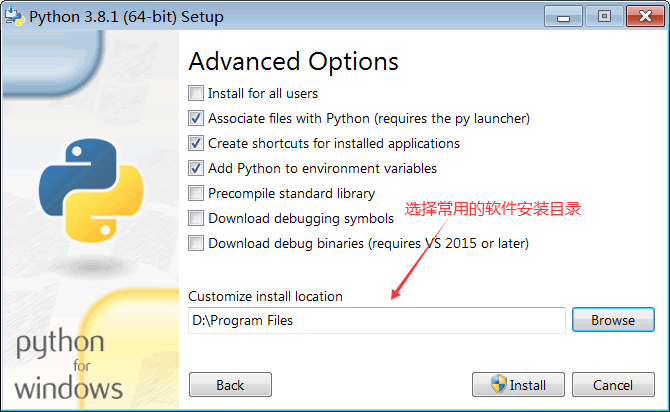 好像有个让把第一个和第四个也选上,反正我是这样做的 |
nttwqz 发表于 2022-7-24 12:07 我也忘记了,反正按照教程做的,图片上有哪个就选哪个了,我看看图片吧 |
| 是不是安装的时候没有勾选py luncher、Associate files with Python (requires the by luncher) |
| 用必应搜索把绕过联发科存储身份认证翻译成英文的结果翻,找到了https://www.xda-developers.com/b ... cation-requirement/页面,以为是过程有问题呢,发现少了个pip install pyusb pyserial json5,但是都按着做了,结果还是一样 |
2010桥段 发表于 2022-7-24 11:48 英文看不懂 |
2010桥段 发表于 2022-7-24 11:48 浏览下主程序就好了,不知道在程序里面的是什么,原来以为就是这个呢 |
| yes,it is true |
Powered by Discuz! X3.3
© 2001-2017 Comsenz Inc.


 组图打开中,请稍候......
 收藏
收藏 支持
支持 反对
反对