|
|
 发表于 2010-10-28 19:09:29
|
显示全部楼层
发表于 2010-10-28 19:09:29
|
显示全部楼层
我这里有一份 VMware Workstation (虚拟电脑)V7.0.1 Build 22760 里面的内容
:s3
cls
echo.
echo ~~~~~~~~~~~~~~~~~~~~~~~~~~~~~~
echo 请选择要进行的操作,然后按回车
echo ~~~~~~~~~~~~~~~~~~~~~~~~~~~~~~
echo.
echo 1、禁用“磁盘映射功能”
echo.
echo 2、启用“磁盘映射功能”
echo.
echo 3、禁用“导入或导出”功能
echo.
echo 4、启用“导入或导出”功能
echo.
echo 5、彻底删除导入或导出相关文件
echo.
echo 6、返回主菜单
echo.
echo 7、退出
:chos3
echo.
set /p choice= 请选择:
IF NOT "%choice%"=="" SET choice=%choice:~0,1%
if /i "%choice%"=="1" goto s31
if /i "%choice%"=="2" goto s32
if /i "%choice%"=="3" goto s33
if /i "%choice%"=="4" goto s34
if /i "%choice%"=="5" goto s35
if /i "%choice%"=="6" goto menu
if /i "%choice%"=="7" exit
echo.
echo 选择无效,请重新输入
echo.
goto chos3
:s31
reg query HKLM\SYSTEM\CurrentControlSet\Services\vstor2-ws60 >nul 2>nul||(echo.&echo 磁盘映射功能已经禁用!任意键返回主菜单&pause>nul&goto menu)
net stop vstor2-ws60 >nul
sc delete vstor2-ws60 >nul
echo.
echo 禁用磁盘映射功能成功!任意键返回本级菜单
echo.
pause >nul
goto s3
:s32
reg query HKLM\SYSTEM\CurrentControlSet\Services\vstor2-ws60 >nul 2>nul&&(echo.&echo 磁盘映射功能已经启用!任意键返回主菜单&pause>nul&goto menu)
sc create vstor2-ws60 type= "kernel" start= "auto" binpath= "%CD%\vstor2-ws60.sys" displayname= "Vstor2 WS60 Virtual Storage Driver" >nul
net start vstor2-ws60 >nul
echo.
echo 启用磁盘映射功能成功!任意键返回本级菜单
echo.
pause >nul
goto s3
:s33
reg query HKLM\SYSTEM\CurrentControlSet\Services\ufad-ws60 >nul 2>nul||(echo.&echo 导入或导出功能已经禁用!任意键返回主菜单&pause>nul&goto menu)
net stop ufad-ws60 >nul 2>nul
sc delete ufad-ws60 >nul 2>nul
del /q %systemroot%\system32\drivers\stcp2v30.sys >nul 2>nul
echo.
echo 禁用导入或导出功能成功!任意键返回主菜单
echo.
pause >nul
goto menu
:s34
if not exist vmware-ufad.exe echo.&echo 导入或导出功能相关文件已经删除,不能启用此功能!任意键返回主菜单&pause>nul&goto menu
reg query HKLM\SYSTEM\CurrentControlSet\Services\vstor2-ws60 >nul 2>nul||(echo.&echo 导入或导出功能需要用到磁盘映射功能!任意键返回本级目录启用磁盘映射功能&pause>nul&goto s3)
reg query HKLM\SYSTEM\CurrentControlSet\Services\ufad-ws60 >nul 2>nul&&(echo.&echo 导入或导出功能已经启用!任意键返回主菜单&pause>nul&goto menu)
copy /y stcp2v30.sys %systemroot%\system32\drivers >nul
sc create ufad-ws60 start= demand binpath= "%cd%\vmware-ufad.exe" displayname= "VMware Agent Service" >nul
reg add "HKLM\SYSTEM\CurrentControlSet\Services\ufad-ws60" /f /v "DependOnGroup" /t REG_MULTI_SZ /d "NetworkProvider\0TDI" >nul
reg add "HKLM\SYSTEM\CurrentControlSet\Services\ufad-ws60" /f /v "DependOnService" /t REG_MULTI_SZ /d "\0" >nul
reg add "HKLM\SYSTEM\CurrentControlSet\Services\ufad-ws60" /f /v "Description" /t REG_SZ /d "VMware Agent Service" >nul
rundll32 setupapi.dll,InstallHinfSection DefaultInstall 128 %cd%\ufad.inf >nul
net start ufad-ws60 >nul
echo.
echo 启用导入或导出功能成功!任意键返回主菜单
echo.
pause >nul
goto menu
:s35
net stop ufad-ws60 >nul 2>nul
sc delete ufad-ws60 >nul 2>nul
del /q %systemroot%\system32\drivers\stcp2v30.sys >nul 2>nul
del /q deployPkg.dll >nul 2>nul
del /q libeaynf32.dll >nul 2>nul
del /a:r /q icudt38l.dat >nul 2>nul
del /q mspack.dll >nul 2>nul
del /q msvcp71.dll >nul 2>nul
del /q msvcr71.dll >nul 2>nul
del /q p2vHlpr.dll >nul 2>nul
del /q p2vJobManager.dll >nul 2>nul
del /q p2vSupport.dll >nul 2>nul
del /q p2vWizard.dll >nul 2>nul
del /q p2vXML.dll >nul 2>nul
del /q reconfigurationDataStore.dat >nul 2>nul
del /q singleJobRunner.dll >nul 2>nul
del /q ssleaynf32.dll >nul 2>nul
del /q stcp2v30.sys >nul 2>nul
del /q tibdll.dll >nul 2>nul
del /q types.dll >nul 2>nul
del /q ufa-agent.dll >nul 2>nul
del /q ufa-client.dll >nul 2>nul
del /q ufa-common.dll >nul 2>nul
del /q ufa-slave.dll >nul 2>nul
del /q ufa-sysMigration.dll >nul 2>nul
del /q ufa-sysReconfig.dll >nul 2>nul
del /q ufa-types.dll >nul 2>nul
del /q ufa-vmImporter.dll >nul 2>nul
del /q ufa-vmsvc.dll >nul 2>nul
del /a:r /q ufad-p2v.xml >nul 2>nul
del /q ufad.inf >nul 2>nul
del /q unzip.exe >nul 2>nul
del /q V2iDiskLib.dll >nul 2>nul
del /q vmcryptolib.dll >nul 2>nul
del /q vmacore.dll >nul 2>nul
del /q vmomi.dll >nul 2>nul
del /a:r /q vmware_drivers.cab >nul 2>nul
del /q vmware-ufad.exe >nul 2>nul
del /q vssSnap2003.dll >nul 2>nul
del /q vssSnapVista64.dll >nul 2>nul
del /q vssSnapVista64.exe >nul 2>nul
del /q vssSnapXP.dll >nul 2>nul
del /q zip.exe >nul 2>nul
rd /s /q ssl >nul 2>nul
rd /s /q data >nul 2>nul
rd /s /q Resources >nul 2>nul
echo.
echo 删除导入导出功能相关文件成功!任意键返回主菜单
echo.
pause >nul
goto menu
:s4
cls
echo.
echo ~~~~~~~~~~~~~~~~~~~~~~~~~~~~~~
echo 请选择要进行的操作,然后按回车
echo ~~~~~~~~~~~~~~~~~~~~~~~~~~~~~~
echo.
echo 1、禁用授权服务
echo.
echo 2、启用授权服务
echo.
echo 3、返回主菜单
echo.
echo 4、退出
:chos4
echo.
set /p choice= 请选择:
IF NOT "%choice%"=="" SET choice=%choice:~0,1%
if /i "%choice%"=="1" goto s41
if /i "%choice%"=="2" goto s42
if /i "%choice%"=="3" goto menu
if /i "%choice%"=="4" exit
echo.
echo 选择无效,请重新输入
echo.
goto chos4
:s41
reg query HKLM\SYSTEM\CurrentControlSet\Services\VMAuthdService >nul 2>nul||(echo.&echo 授权服务已经禁用!任意键返回主菜单&pause>nul&goto menu)
vnetlib.exe -- stop authd
vnetlib.exe -- unstalll authd
echo.
echo 禁用授权服务成功!任意键返回主菜单
echo.
pause >nul
goto menu
:s42
reg query HKLM\SYSTEM\CurrentControlSet\Services\VMAuthdService >nul 2>nul&&(echo.&echo 授权服务已经启用!任意键返回主菜单&pause>nul&goto menu)
vnetlib.exe -- install authd
vnetlib.exe -- start authd
echo.
echo 启用授权服务成功!任意键返回主菜单
echo.
pause >nul
goto menu
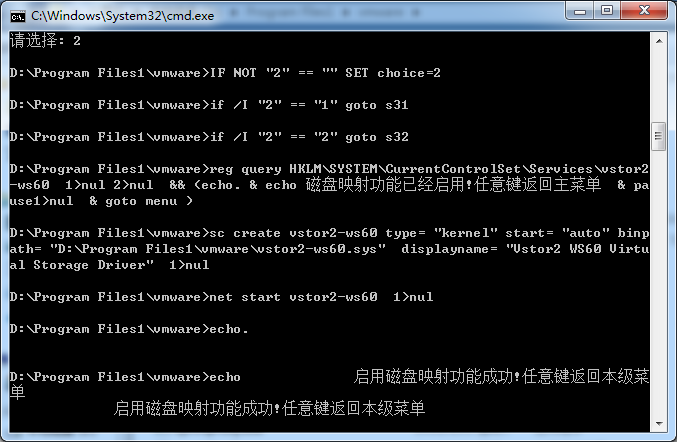
下面是测试报告: |
-
输入2的结果
|

 闽公网安备35020302032614号 )

 IP卡
IP卡 狗仔卡
狗仔卡 提升卡
提升卡 沉默卡
沉默卡 喧嚣卡
喧嚣卡 变色卡
变色卡 千斤顶
千斤顶 显身卡
显身卡