本帖最后由 2012swd 于 2026-7-12 11:40 编辑
如何激活Windows/Office/延长在线更新支持 (ESU)?
方法 1 - PowerShell(推荐)
此方法最方便,需在Win8.1, 10, 11下运行:
1.点击开始菜单,输入并打开PowerShell。
2.复制粘贴以下命令,并回车。
irm https://get.activated.win | iex
3.在随后出现的窗口中,输入其中一个绿色选项的相应数字,等待完成。
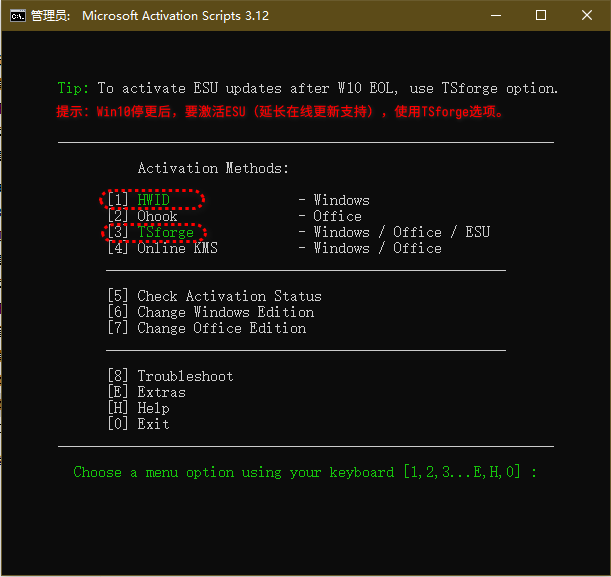
因某些网络运营商封锁链接,命令拒绝执行,运行以下命令绕过DNS封锁 (仅适用于Win10/11): iex (curl.exe -s --doh-url https://1.1.1.1/dns-query https://get.activated.win | Out-String)
如果收到TLS/SSL错误(使用Win8.1或10等老版本Windows系统),运行主命令前先运行以下命令: [Net.ServicePointManager]::SecurityProtocol=[Net.SecurityProtocolType]::Tls12
方法 2
如果你更倾向于下载激活文件或无法使用方法1时,则使用方法2。
1.下载脚本: MAS_AIO.cmd(访问码:u6s6)
2.运行MAS_AIO.cmd
3.在随后出现的窗口中,输入其中一个绿色选项的相应数字。(win7系统只能使用kms,180天后需再次激活。)
MAS最新发布 v3.12 (2026年7月4日)
|

 闽公网安备35020302032614号 )

 IP卡
IP卡 狗仔卡
狗仔卡 发表于 2025-4-30 16:21:26
 提升卡
提升卡 沉默卡
沉默卡 喧嚣卡
喧嚣卡 变色卡
变色卡 千斤顶
千斤顶 显身卡
显身卡